Modeling of the fluid
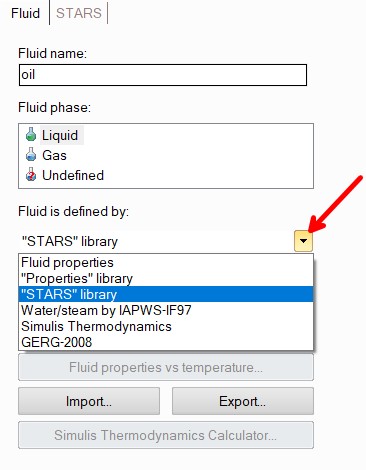
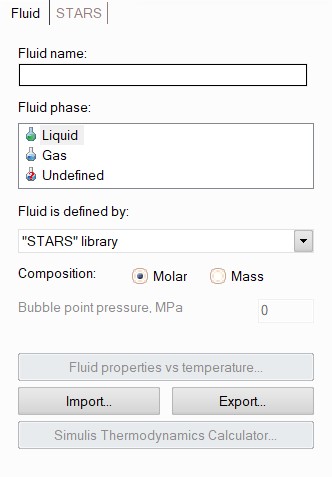
When you create a new pipeline, a "Fluid" element is automatically added to the project tree with the pipeline. To specify the fluid parameters, select this element in the project tree, and its data set will be displayed in the Object Properties Window:
For a fluid, you must enter its name (specify the name that you would like to see in output documents with calculation results), select the phase state and specify the method for calculating/setting the fluid properties.
The fluid modeled in Hydrosystem can be saved in a separate file with the extension .prs for its subsequent loading into other projects. To save and load the product, use the Export... and Import... buttons. In addition, fluids saved in Hydrosystem can then be used in other PASS software, such as 'Safety Valve' and 'Insulation' (as well as fluids saved in these programs can be imported into Hydrosystem).
Modeling of mixing the fluids with different compositions in different branches
If necessary, you can add your own
fluids to the terminal branches of the pipeline using the  button of the Components
toolbar (or the corresponding Insert
menu item or the context menu called by right-clicking on the branch).
This may be necessary if you need to calculate a pipeline in which fluids
with different compositions are mixed. In this case, all parameters of
the "main" fluid (or fluids in case of “frozen” two-phase gas-liquid
flow) specified for the pipeline (phase state, calculation method, composition
units, etc.) are assumed the same for the fluids of all branches, with
the exception of the composition - it can be set differently for each
fluid. Fluids specified for non-inlet branches are ignored in the calculation.
For inlet branches with unspecified fluids, the fluid composition is taken
as the same as that of the "main" fluid (specified for the pipeline).
At the moment, the calculation of pipelines with different fluids in different
branches is available only when specifying a fluid using the "STARS" library and only for single
phase and “frozen” gas-liquid flow.
button of the Components
toolbar (or the corresponding Insert
menu item or the context menu called by right-clicking on the branch).
This may be necessary if you need to calculate a pipeline in which fluids
with different compositions are mixed. In this case, all parameters of
the "main" fluid (or fluids in case of “frozen” two-phase gas-liquid
flow) specified for the pipeline (phase state, calculation method, composition
units, etc.) are assumed the same for the fluids of all branches, with
the exception of the composition - it can be set differently for each
fluid. Fluids specified for non-inlet branches are ignored in the calculation.
For inlet branches with unspecified fluids, the fluid composition is taken
as the same as that of the "main" fluid (specified for the pipeline).
At the moment, the calculation of pipelines with different fluids in different
branches is available only when specifying a fluid using the "STARS" library and only for single
phase and “frozen” gas-liquid flow.
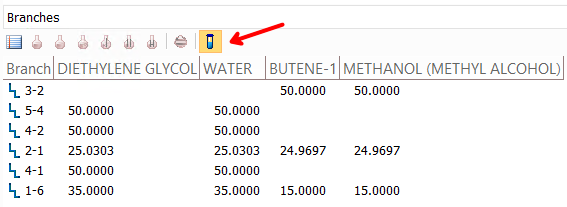
The fluid composition at each branch (both, specified and calculated) can be then viewed in input data list window and calculation results window by selecting the "Branches" representation and clicking on the corresponding button in the upper left part of this window:
Modeling of fluids with different phase state
To calculate the liquid flow, you must select "Liquid" as the fluid phase. Please note that in this case, the calculation may be inaccurate if the liquid boils in the pipeline. When calculating, the program will only be able to diagnose the phase transition (if the fluid is defined using method allowing to check the phase equilibria), but it is impossible to correctly calculate the flow with a phase transition using this model.
To calculate the gas flow, you must select "Gas" as the fluid phase. Please note that in this case, the calculation may be inaccurate if gas condensation occurs in the pipeline. When calculating, the program will only be able to diagnose the phase transition (if the fluid is defined using method allowing to check the phase equilibria), but it is impossible to correctly calculate the flow with a phase transition using this model. To calculate the supercritical fluids, the aggregate state "Gas" should also be used.
To calculate the flows of vapor-liquid mixtures, the program provides two different calculation models:
flow model taking into account flashing/condensation of the fluid along the flow. This model is suitable for calculating flows with phase transitions (from gas to a two-phase region, from a two-phase region to liquid, etc.), as well as for calculating flows of gas-liquid mixtures in which noticeable boiling/condensation of the fluid occurs along the flow. To use this model, select "Undefined" fluid phase;
"frozen"
gas-liquid flow model. This model assumes that there
is no mass transfer between the gas and liquid phases in the flow.
Therefore, this model is suitable only for calculating such vapor-liquid
flows in which the effects of boiling/condensation of the fluid
along the flow can be neglected. With abundant boiling/condensation
of the fluid in the pipeline, and especially in case of phase
transitions, the "frozen" flow model can give a noticeable
error in the calculation. When using this model, the parameters
of the liquid and gas phases are specified separately. To do this,
you need to add
another fluid (in addition to the existing one) in the
project tree using the button of Components
toolbar (or the corresponding Insert
menu item), for the first fluid specify the phase state "Liquid"
(and model the liquid phase in it), for the second specify the
phase state "Gas" (and model the gas phase in it):
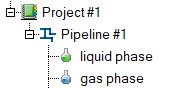
Please note that the liquid phase must be the first in the project tree, followed by the gas. The ratio of liquid and gas phases in the flow is then specified separately when defining the pipeline branches.
To calculate the flows of "three-phase"
mixtures of oil, water and gas (where oil and water are
immiscible liquids), you need to add
two more fluids (in addition to the existing one) in the
project tree using the
button of Components
toolbar (or the corresponding Insert
menu item), for the first fluid specify the phase state "Liquid"
(and model the oil
properties in it), for the second, also the phase state "Liquid"
(and model the water
properties in it), and for the third fluid specify
the phase state "Gas" (and model the gas in it):
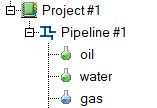
Please note that oil should be first in the project tree, then water, then gas. The phase ratios in the flow are then specified separately when specifying the pipeline branches. When calculating three-phase flows, it is assumed that the mixture of water and oil is a homogeneous emulsion; possible mass transfer between the phases (boiling of oil and/or water, condensation of gas in liquid, etc.) is not taken into account in the calculation.
To calculate the flows of mixtures of liquids with solid particles (a.k.a. settling 'slurry' flow), you need to select the "Liquid " fluid phase state and model only the liquid phase in it. The properties and quantities of solid phase are then specified separately in the solid phase parameters for the pipeline. When calculating the flows of mixtures of liquids with solid particles, the mass transfer between the phases is not taken into account in the calculation, thus it is impossible to model the processes of crystallization and dissolution in this calculation.
Please note that any other ways of specifying the fluid phase states other than those specified above are not allowed in the program. For example, you cannot specify one fluid with the "Undefined" phase state, another as "Liquid" (or any similar combinations) and calculate the flow of their mixture.
Methods for calculating fluid properties
The Hydrosystem provides various methods for calculating and setting the properties of the fluid in pipeline, which are selected in the corresponding drop-down list. These include: