Modeling of solid phase in flow (a.k.a. slurry flow)
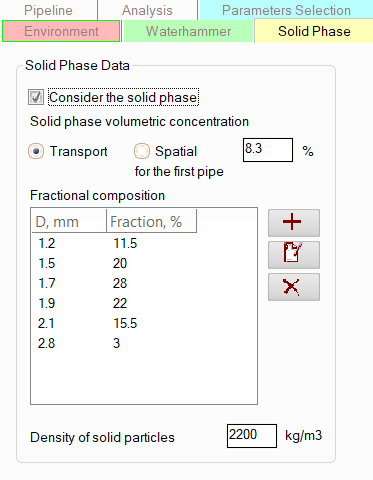
When calculating liquid flows containing solid particles (various types of suspensions, pulps, etc.), the parameters of each phase are specified separately. The properties or composition of the liquid phase are specified in the fluid parameters, and to specify the parameters of the solid phase in the flow, you must select the pipeline in the project tree and then open the "Solid Phase" tab (for convenience, this tabs is highlighted in a separate color - yellow) for it in the Object Properties Window. The following information is specified here:
consider the solid phase - this option enables taking into account the solid phase in the flow;
solid phase volumetric concentration, % - please note that the solid phase fraction must be specified at the beginning of the flow (on the first section of the pipeline). For subsequent sections, the fraction may change if the phases move at different velocities (and the so-called "phase slippage" occurs). It is allowed to specify either the 'transport' volume fraction (i.e., the ratio of the solid phase volumetric flow rate to the volumetric flow rate of the mixture of liquid with solid inclusions), or the 'spatial' (or 'true') volume fraction - i.e., the ratio of the volume occupied in the pipe by the solid phase to the total volume of the pipe. It should be remembered that the 'transport' and 'spatial' fraction values coincide only in the case of an ideally homogeneous mixture in which the liquid and solid phases move at the same velocities. If the phases move with different velocities, the phase flowrates ratio will be one, but the ratio of the volumes they occupy in the pipe may be completely different, which is taken into account in the calculations in the program;
fractional or granulometric composition of the solid phase - here the table of distribution of solid particles by diameters is set. To add, edit and delete points of the fractional composition table use the corresponding buttons to the right of the table. If the granulometric composition of the solid phase is unknown, it is allowed to set only one point in the table, for which the average particle diameter (or maximum, depending on the case to be modeled) and the fraction of 100% should be indicated. But in this case the calculation accuracy may be not that high as in case of calculation with specified particles size distribution;
density of solid particles.
The solid phase parameters specified for a pipeline are inherited for all its branches. If necessary, the solid phase parameters can then be fine-tuned for each branch (for example, if several streams with different solid phase contents are mixed). To do this, select the appropriate branch in the tree and open the "Solid Phase" tab for it in the Object Properties Window. The solid phase parameters entered/corrected for a branch are then inherited for all lower branches in the project tree until a branch is encountered with solid phase parameters that differ from the previous branches (this can happen, for example, if the solid phase properties for this branch were previously changed). If such a branch is encountered, inheritance is stopped on it, and this and all subsequent branches in the project tree will retain the previous solid phase parameters.
Please note that in the current version of the program, when mixing flows with different solids contents, the resulting solids fraction is not calculated automatically – it must be set manually for each pipeline branch.