Simulis Thermodynamics
Unlike the libraries "Properties", "STARS" and others, Simulis Thermodynamics is not built into the Hydrosystem. Simulis Thermodynamics is a separate program for calculating the properties and phase equilibria of various substances and their mixtures, which can be used "inside" the Hydrosystem. To do this, you need to purchase a license for this program and install it on a computer with the Hydrosystem (more information about Simulis Thermodynamics can be found here).
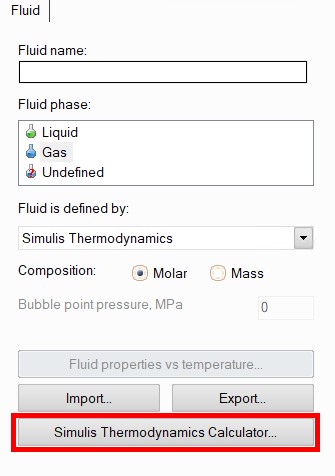
When modeling a fluid using Simulis Thermodynamics, it is necessary to enter its molar or mass (which is indicated using the corresponding switch in the Object Properties Window) component composition. The fluid composition is specified by launching the Simulis Thermodynamics calculator by pressing the corresponding button in the Object Properties Window for the fluid:
This will open the Simulis Thermodynamics window, where you can add fluid components (including "pseudo-components"), select methods and specify calculation settings. Please note that mazuts calculations are not performed using this program. Detailed information about the interface, capabilities and methodology of Simulis Thermodynamics is provided in the user manual and help system of this program (brief information about the substances and calculation methods available in Simulis Thermodynamics can be found here).
After specifying the fluid composition in Simulis Thermodynamics, the entered components will be automatically added to the Hydrosystem's project tree. For each component, its code will be displayed in the corresponding field in the Object Properties Window, which, if necessary, allows you then to switch the method for calculating fluid properties to some other library without re-entering the components (of course, only if this library contains all the components entered).
Please note that the component contents in the mixture are specified not in Simulis Thermodynamics, but in the Hydrosystem. Therefore, after entering the components, you will need to select them one by one in the project tree and specify the percentage content for each in the corresponding field of the Object Properties Window.
In addition, when using Simulis Thermodynamics,
fluid components can also be added in the Hydrosystem. To do this, select
the fluid (or any already existing component of this fluid) in the project
tree and click the  button
of the Components
toolbar (or use the corresponding Insert
menu item). Next, in the Object Properties Window for the added component,
you will need to select a substance (or pseudo-component) and set its
percentage content.
button
of the Components
toolbar (or use the corresponding Insert
menu item). Next, in the Object Properties Window for the added component,
you will need to select a substance (or pseudo-component) and set its
percentage content.
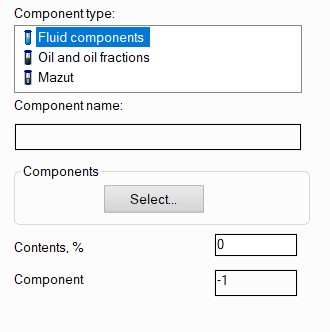
When you click the "Select" button, the Simulis Thermodynamics window will open, where you will need to find and select the required substance (you can also set pseudo-components in a similar way). However, this method is less convenient, since you need to set the components one at a time, while using the Simulis Thermodynamics calculator you can add several components at once.