STARS Library
This library is designed to calculate the properties and phase equilibria of various pure substances (and pseudo-components) and their mixtures with each other. Unlike other libraries built into the Hydrosystem, "STARS" has the most extensive database of substances (including over 1600 components), in addition, it has flexible tools for modeling oils (by TBP and ASTMD86 distillation curve). It is also important that the "STARS" library allows not only to determine the properties of substances and mixtures, but also to perform phase equilibrium calculations. Thus, when using this library, it is possible to check the phase state of the fluid, predict phase transitions along the flow, and "STARS" can be used to calculate flows with phase transitions and gas-liquid flow (with an "Undefined" phase state). Therefore, the developers of the Hydrosystem recommend using the "STARS" library as the default tool for modeling the fluid.
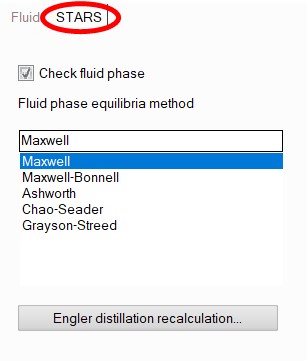
Checking the phase state during calculations using the STARS library is optional; you can enable/disable it by going to the STARS tab of the Object Properties window for the fluid:
The method for calculating the vapor-liquid equilibrium for mixtures is also selected there; when calculating pure substances, the method for calculating phase equilibrium is not specified, since for pure substances the phase state is uniquely determined by the parameters of the saturation line of a given substance. A description of the methods for calculating phase equilibria and the properties of substances and their mixtures according to the STARS library can be found here.
When modeling a fluid using the STARS library, it is necessary to enter its molar or mass (which is indicated using the corresponding switch in the Object Properties Window) component composition.
To add a fluid component, select
the fluid (or any already existing component of this fluid) in the project
tree and click the  button
of the Components
toolbar (or use the corresponding Insert
menu item). Next, in the Object Properties Window for the added component,
you will need to select a substance (or pseudo-substance) and set its
percentage content.
button
of the Components
toolbar (or use the corresponding Insert
menu item). Next, in the Object Properties Window for the added component,
you will need to select a substance (or pseudo-substance) and set its
percentage content.
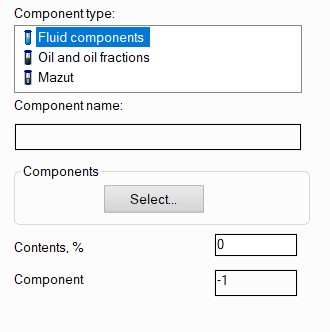
In the STARS library, all substances and fluids are grouped into three categories:
fluid components - "ordinary" chemical substances and compounds;
oil and oil fractions - this category is used to model various oils, petroleum, gasoline, kerosene, fuels, etc. by their fractional composition;
mazuts a.k.a. black oils
Modeling of pure substances and their mixtures
When selecting "Fluid components", you must click the "Select" button to search and select a component from the STARS library database:
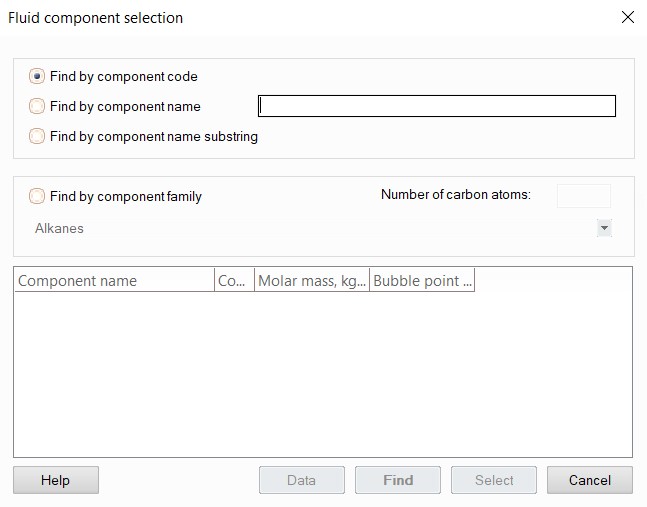
The component can be found:
by component code - this search option is very convenient in cases when you need to find a substance that occurs in your calculations so often that you have already managed to remember its code (the codes of all substances in the "STARS" library can be viewed here). In this case, simply enter the component code in the search bar and click the "Find" button - the program will find the substance with this code;
by component name - this option is used for searching the substances with relatively simple names (the names of all substances used in the "STARS" library can be found here). Simply enter the exact name of the substance in the search bar, select search by component name and click the "Find" button - the program will find the substance with exactly this name;
by component name substring (or fragment of name) - this option is convenient when searching the substances with complex names or if you do not remember the full name of the substance. In this case, select the search by component name substring, enter a fragment of the substance name and click the "Find" button - the program will find all substances in the name of which the entered letter combination occurs;
by component family - this option is convenient for searching the organic compounds if you need to find a substance/substances of a certain chemical family. To do this, select the search by component family, in the drop-down list below specify the family of the component you need to find, plus you can additionally add a filter by the number of carbon atoms in the molecule of the substance you are looking for (if you do not enter it, all substances from this class will be found). When you click the "Find" button, the program will display a list of substances that meet the selected criteria.
Once the required substance has been found, you can view its main characteristics and reference constants. To do this, select the substance in the list of found components and click the "Data" button:
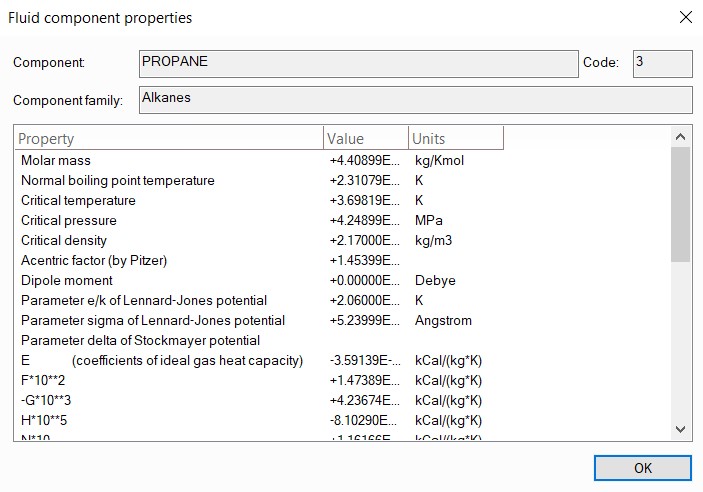
To add a found component, select it in the list of found substances and click the "Select" button (or simply double-click the left mouse button on the substance name in the list). After selecting a component, its code will be displayed in the corresponding field, which, if necessary, allows you then to switch the method for calculating fluid properties to some other library without re-entering the components (of course, only if this library contains all the components entered). The full list of substances and fluids available in the "STARS" library can be found here.
Modeling of oils by TBP distillation curve
To model oils using the STARS library, select the "Oil and oil fractions" component type and fill in the fraction parameters in the fields that appear below - its bubble point, specific gravity, molar mass and percentage content of the fraction in the mixture:
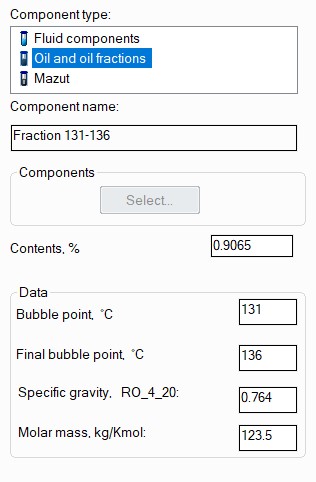
This method of setting is called TBP distillation or TBP curve. That is, oil/petroleum is modeled not as a mixture of individual substances, but as a mixture of certain fractions (in the reference literature they can also be found under the name "pseudo-components" or "pseudo-substances") - groups of substances with approximately similar boiling points. Accordingly, each of these fractions must be set as a separate component of the fluid and the above parameters must be set for it. In addition, it is allowed to model a mixture of oil fractions with ordinary pure substances in one fluid (for example, quite often light hydrocarbons in oil - ethane, propane, butane, etc. - are set as substances, and heavier components as oil fractions).
Note that:
if you do not have information on the heaviest fraction in the distillation curve (quite often the end boiling point of the "residue" is unknown), specify a value higher than 2000°C as the final bubble point of this fraction. In this case, the program will determine the end boiling point approximately and will use it in calculations. However, this method works more or less correctly only if the mixture contains at least 3 fractions (including the heavy "residue" itself). If there is one or two fractions in the distillation, the end boiling point should be specified by the user (but not more than 1000°C);
if you do not have information on the ranges of boiling temperatures of fractions, but only on their average boiling temperatures, simply set the average boiling temperature of the fraction as the temperature of the bubble point and final bubble point for each fraction. This method of setting is called distillation by average boiling temperatures, and the "STARS" library can work with it correctly;
if you do not have information on the molar masses of the fractions, you can leave them blank. In this case, the program can approximately estimate them using the corresponding empirical correlations, but the accuracy of the property calculation in this case may decrease. If the molar masses are known only for some fractions, then it is better not to set them at all than to set them only for part of the fractions;
the specific gravity of the fraction Ro_4_20 is the ratio of the density of the fraction at a temperature of 20°C to the density of water at 4°C (about 1000 kg/m3).
Oil fractions can be used not only for modeling oil distillation. They are often used to model various types of oils, "crude" oil (for which the fractional composition is unknown) and other media, specifying them as fractions with a very wide boiling range. However, it is important to understand that this method of setting can only give a very rough estimate of the thermophysical properties of the fluid (and even more so, the fluid should not be modeled this way if it is necessary to calculate not only the properties, but also phase equilibria). And the calculation error will be greater, the greater the difference between the temperature of the beginning and end of the boiling of the fraction. Therefore, fractions with a wide boiling range should be used only in cases where there are no other options for modeling a given fluid.
Modeling of oils by Engler (ASTM D86) distillation
Another type of oil distillation that is also encountered in practice is the "Engler distillation" (also known as ASTM D86 distillation). This type of distillation is most often used for oils with a not very wide boiling range (kerosene or jet fuel oils, for example).
If the Engler distillation parameters are known for oil, such oil can be modeled in the Hydrosystem using the STARS library. To do this, select the fluid in the project tree, select the mass units of the composition in the Object Properties Window, then go to the STARS tab and click the "Engler distillation recalculation..." button there:
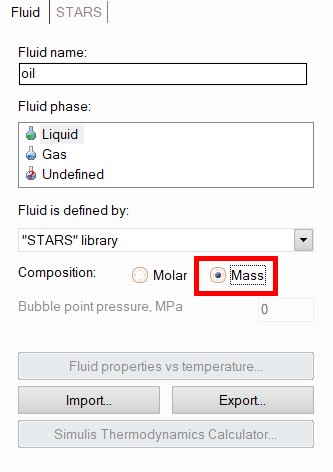
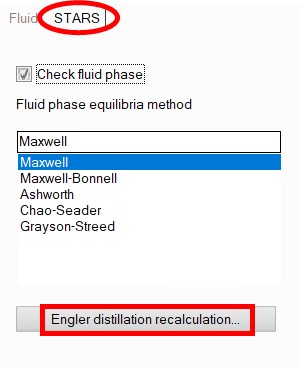
Please note that all already entered fluid components will be deleted, about which the program will issue a corresponding warning.
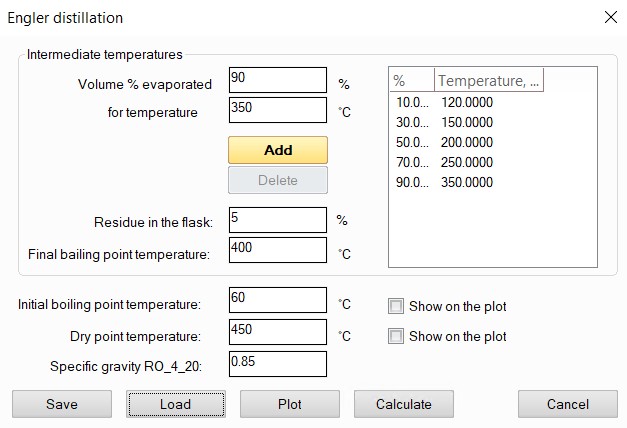
The distillation data should be entered in the window that appears, point by point, in the Volume % evaporated and for temperature fields. After clicking the Add button, the entered data is added to the table on the right. To delete a point from the table, select it and click the Delete button.
After entering the Volume % evaporated versus temperature dependence and filling in the Residue in the flask and Final boiling point temperature fields (if these data are available), the Plot button allows you to display the entered points on the graph. Note that Final boiling point temperature and Dry point temperature only match if Residue in the flask is zero. If Residue in the flask and Final boiling point temperature are unknown, these fields should be left blank.
The Initial boiling point temperature, Dry point temperature and Specific gravity RO_4_20 (the ratio of oil density at 20 °C to water density at 4 °C) fields must be filled in. For a clearer representation of the Engler distillation curve, the initial boiling point and dry point temperature can be plotted on the graph by checking the Show on plot boxes opposite the corresponding fields. These points can be changed, and the graph will change accordingly.
The Save button allows you to write Engler distillation data to a file with the .ngl extension. The Load button allows you to load a previously saved Engler distillation.
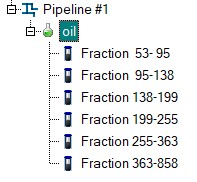
When you click the Calculate button, the Engler distillation will be converted to TBP distillation. The resulting oil fractions will be added to the project tree:
Modeling of mazuts (a.k.a black oil, fuel oil)
To model mazuts using the STARS library, it is necessary to select the "Mazut" component type, and then specify the mazut type and its specific gravity Ro_4_20 (the ratio of the mazut density at a temperature of 20°C to the density of water at 4°C) in the corresponding fields.
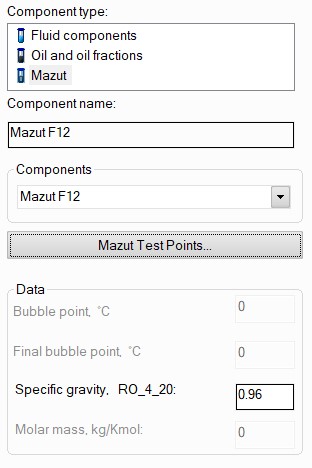
The program provides the calculation of various types of mazuts according to GOST 10585. If you need to simulate any mazut that is produced not according to this GOST, but according to the manufacturer's specifications, then you need to determine which type of mazut according to GOST 10585 it is closest to.
Next it is recommended to set the experimental values of the kinematic viscosity of mazut in cSt depending on the temperature (no more than two points) by clicking on the "Mazut test points" button. If they are unknown, the viscosity can be set in degrees of relative viscosity.
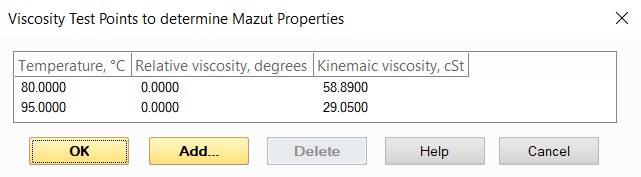
If there are no data on experimental viscosity values, they can be omitted - in this case, the calculated viscosity values will be approximately estimated by the program. However, the results in this case can be greatly overestimated (up to several tens of percent). In addition, note that at temperatures below 50°C, M100, M40 and F12 mazuts can behave as non-Newtonian fluids, so their calculation can have a significant error.
After setting the mazut parameters, its content is not set - it is assumed that, if selected, the mazut is the only component of the fluid and the fluid should not contain any other media/substances (therefore, when specifying mazut, the ability to add any other components to the fluid is blocked)..
Modeling of diesel and jet fuels
Calculation of the properties of diesel and jet fuels using the STARS library can be done in two different ways:
It is possible to model these environments as individual substances (they are contained in the database under codes from 1603 to 1606). But the calculation in this case will be very approximate, since these fuels differ from batch to batch, and their composition depends heavily on the manufacturing plant. This will not be taken into account in the calculation, and the fuel will be presented as some kind of 'average' fluid;
Since each batch of these fuels usually has a fluid passport indicating the % of distillation to temperature T °C (at least two points) and density at 15°C (or 20°C), it is recommended to enter this data by using Engler distillation and perform the calculation for a more accurate calculation of the properties of a specific batch. It should be taken into account that these distillation curves are a straight line except for the "tails" of the beginning and end of distillation. The user must plot the points of these "tails" on the graph themselves, based on "technological plausibility". The error in calculating the kinematic viscosity with this modeling method is usually about 3%, with a maximum deviation of 10%. If the fluid passport specifies the density at 15°C and does not specify the density at 20°C, it can be approximately estimated using the formula RO_4_20 = (RO_4_15 – 0.00914)/0.9934.