Manual fluid properties input
For cases when the properties of the pumped fluid are known in advance (for example, they were calculated in another program, found in a reference book, or measured experimentally), the Hydrosystem provides the ability to manually enter the fluid properties.
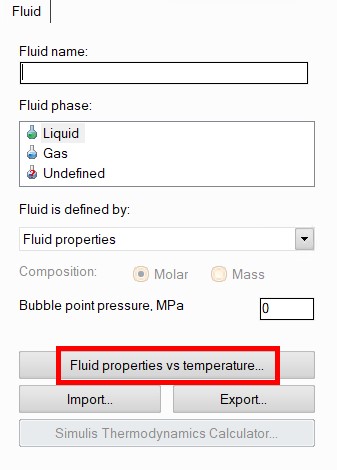
To enter the values of the thermophysical properties of the fluid manually, you must select "Fluid properties" in the drop-down list of calculation methods in the Object Properties Window for the fluid, and then click the "Fluid properties vs temperature..." button:
In the window that appears, you need to fill in the table of fluid properties vs temperature.
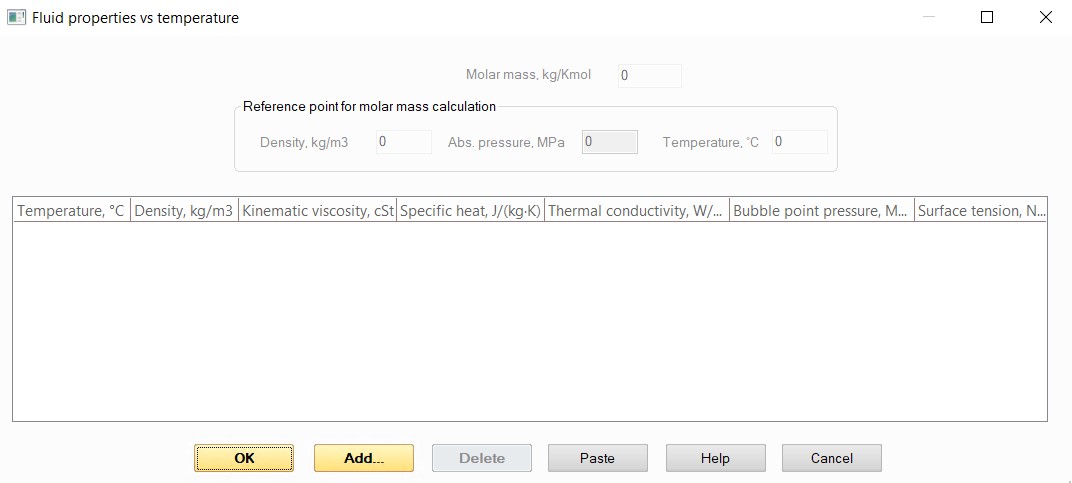
To add rows to the table, use the Add button; if you need to delete a row, select it in the table and use the Delete button; to edit entered values, double-click it in the table with the left mouse button. If you have already prepared the properties vs. temperature table in some other program (for example, in Excel or in any other text/table format), you can copy it and paste it into Hydrosystem using the Paste button. When pasting, make sure that the copied array contains data in the same order as the columns of the property table in Hydrosystem and the properties in the same units of measurement.
Depending on the fluid phase state and what type of calculation you plan to perform, you will need to enter a different set of fluid properties.
Manual properties input for liquids
If you plan to perform a flow calculation with a constant fluid temperature (isothermal calculation, diameters calculation or waterhammer calculation modeled on the basis of an isothermal calculation of steady flow), it is required to enter only the density and viscosity of the liquid at a given temperature in the table. Please note that the density and viscosity must be specified exactly for the temperature/temperatures specified in the pipeline branches. For example, if the flow temperature in a pipeline branch is specified as 50 °C, and the density and viscosity at 20 °C are entered in the properties table, the calculation will be interrupted with an error, since knowing the values of the fluid properties at one temperature it is extremely difficult to predict what they will be at other temperatures.
If you plan to perform a heat calculation of a pipeline, you must enter the density, viscosity, specific heat capacity and thermal conductivity of the fluid for a range of temperature values. Moreover, this range must completely cover the range of fluid temperatures in the pipeline, taking into account cooling/warming of the fluid. For example, if you entered properties for temperatures from 20 to 50°C in the table, specified the initial flow temperature in the pipeline branch of 40°C, then ran the heat calculation and during the calculation it was found out that the fluid temperature along the flow in the pipeline drops below 20°C, then at this point the calculation may be interrupted with an error. This is due to the fact that knowing the values of fluid properties in a certain temperature range, it is extremely difficult to correctly estimate what the properties will be at temperatures outside this range. Therefore, if such errors occur in calculations, make sure that the data array you entered completely covers the range of fluid temperature change in the pipeline and, if necessary, add the property values at lower/higher temperatures to the table. It is necessary to enter properties into the table for at least two different temperature values, but it is recommended to enter 3 or more points into the table so that the interpolation of properties for intermediate temperature values is more “physical”;
If you plan to calculate the NPSH (before pumps or at some other points in the pipeline), then in addition to the properties mentioned above, you must also enter the values of the bubble point pressure of the liquid;
If this liquid is specified as part of a "frozen" gas-liquid flow, then in addition to the properties mentioned above, it is also necessary to enter the values of the surface tension coefficient of the liquid;
If you plan to perform a waterhammer calculation, you must also enter the value of the liquid compressibility coefficient (aka coefficient of isothermal isentropic compressibility) for a more accurate calculation of the shock wave velocity. It is specified among the waterhammer calculation settings on the "Waterhammer" tab of the Object Properties window for the pipeline.
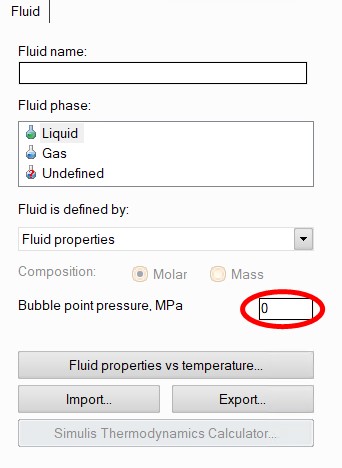
In addition, an alternative method of specifying properties is also provided for liquids - entering properties values directly in the pipeline branches. To do this, select "Fluid properties" in the list of fluid property calculation methods, but do not fill in the table of fluid properties vs temperature. In this case, when specifying the initial data for the branches, you will be prompted to enter the values of liquid density and viscosity for each of the branches in the corresponding fields of the initial data. If, when using this method of fluid specifying, it is also necessary to calculate the NPSH, enter the value of the bubble point pressure of the liquid in the corresponding field of the Object Properties Window for the fluid:
If, when using this method of fluid specifying, it is necessary to model the change in fluid properties along the flow (for example, caused by cooling/warming of the flow), use the element "Component with known change of pressure and/or temperature" in this place of the piping system - for it, the density and viscosity of the liquid at the outlet of this element will also be available for assignment.
Manual properties input for gases
For gases, the table of properties has slightly different contents than for liquids:
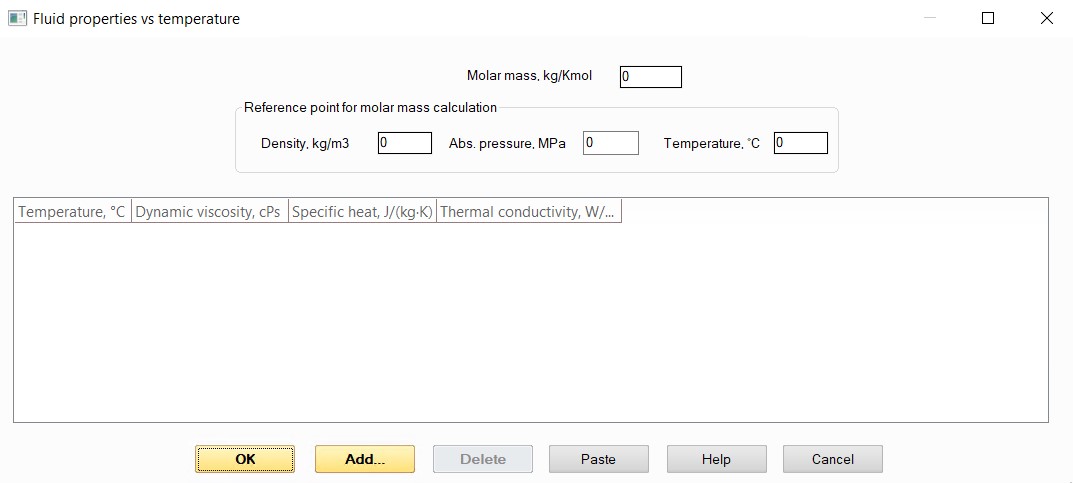
For gases, it is necessary to specify the molar mass or a reference point for its calculation (gas density at any known pressure and temperature). In addition, the following properties must be entered into the properties table:
viscosity of the gas at the working temperature in the pipeline (that specified in the pipeline branches), if it is planned to perform an isothermal analysis or diameters calculation;
viscosity, specific heat capacity and thermal conductivity of the gas for a range of temperature (for at least two different temperature values, but it is recommended to enter 3 or more points into the table so that the interpolation of properties for intermediate temperature values is more “physical”), if it is planned to perform a heat calculation of the pipeline.
As in the case of manual input of liquid properties, the temperature range of the entered array of properties must completely cover the range of fluid temperature in the pipeline.
Manual properties input for gas-liquid flow
Please note that when specifying the "Undefined" fluid phase state, the manual input of properties is not allowed, since it is impossible to describe the phase equilibrium of the fluid, boiling and condensation etc. in tabular form. Therefore, to calculate flows with phase transitions and gas-liquid flow taking into account mass transfer between phases, it is necessary to specify the fluid using one of the thermodynamic libraries available in the program.
For modeling other types of multiphase flows ("frozen" gas-liquid flow or "three-phase" systems), the properties of each phase can be specified manually. This is done in the same way as shown above for cases of manual input of the of liquids and gases.