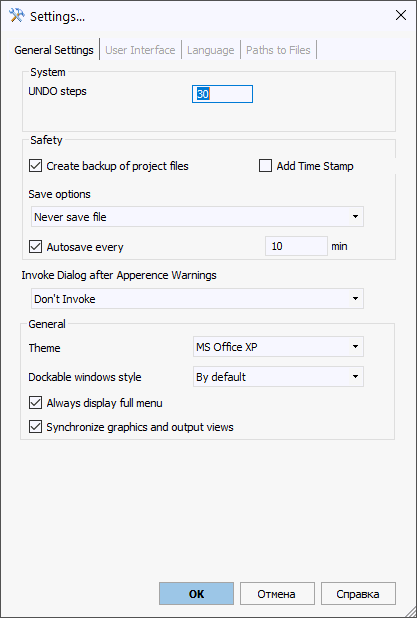
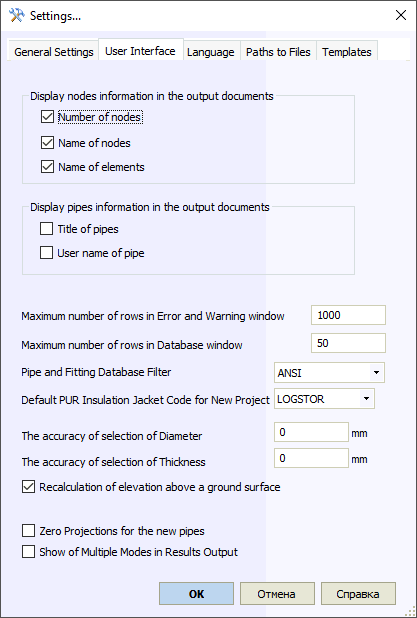
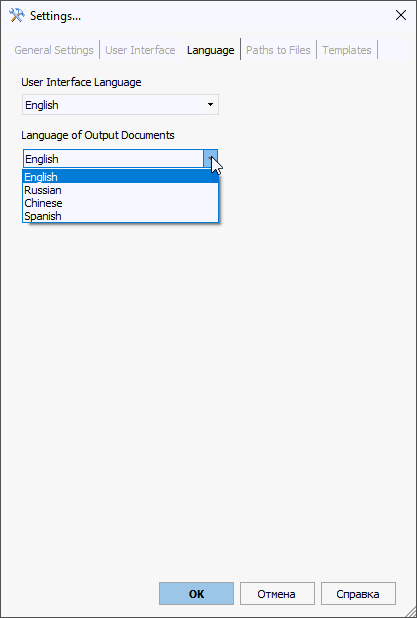
Configure global START-PROF application settings in this dialog
Property |
Description |
UNDO steps |
Number of actions available for undo/redo. Higher values require more memory. Set to zero for large models to disable UNDO and improve performance. |
Use OpenGL emulation |
Enable for software-based 3D rendering. Disable for hardware-accelerated 3D graphics. Use emulation only if experiencing 3D view issues - performance will be slower. |
Create backup files |
Create two backup copies when enabled: project_name.bak0 and project_name.bak. .bak0 creates when loading a project. .bak saves input and output data before last save. Files save to folder defined in General Settings > Paths to Files > Temp Files |
Add Time stamp |
Create backup copies with date/time stamps: "~20-05-09(14-50).bak" Files save to folder defined in General Settings > Paths to Files > Temp Files |
Interface style |
User interface visual theme |
Panel docking mode |
Floating window docking behavior |
Always show full menu |
Display complete START-PROF menus (not just frequently used commands) |
File actions before analysis |
Behavior before analysis |
Autosave |
Create automatic backup copies
at specified intervals. Configure
interval in settings. When "Same as data file" selected but file never saved, copies save to: C:\Users\<username>\AppData\Local\Temp\D5F756EDD5594dd88622F52E5FF84E73.CTAPT1.ctp |
Check for updates |
Enable automatic update checking |
Rotation type |
3D model rotation in 3D view. "Spherical" - standard rotation (versions up to 4.62). "Cylindrical" - rotation around vertical Z-axis. |
Property |
Description |
Show nodes and names in output |
Display nodes and names when printing or exporting to Word |
Delete invalid results |
Automatically delete analysis results when integrity checks fail |
Max error/warning rows |
Limit messages in Error and Warning window. Set to 0 for unlimited. Recommended: 50-100 for large models to improve performance |
Maximum Width of the column with the name |
Prevents result tables from becoming too wide by truncating long element names. A value of 0 disables truncation and allows for unlimited column width |
Maximum Number of pipes for updating the project tree |
The project tree updates automatically if the model contains fewer sections than this limit. Setting the value to 0 disables auto-refresh |
Max database rows |
Default database display shows 100 rows. Adjust as needed |
Pipe/Fitting Database Filter |
Filter databases by standard. Example: "ASME" shows only ASME-compliant components |
Default PUR insulation |
Default pre-insulated pipe manufacturer for new projects. Override in project settings |
Diameter selection tolerance |
Matching tolerance for diameters from pipe and fitting databases |
Thickness selection tolerance |
Matching tolerance for wall thickness from pipe and fitting databases |
Zero projections for new pipes |
New pipe elements inherit DX,DY,DZ from previous pipe. Enable to start with zero values |
Save internal model for review |
Generate internal model of trunnions, bends, tees, etc. for review for debug purposes |
Show all modes in results |
Enable "Show all modes" checkbox by default in output |
Property |
Description |
Interface Language |
User interface language (requires START-PROF restart) |
Output Document Language |
Language for exported documents: Word, text files, HTML, etc. |
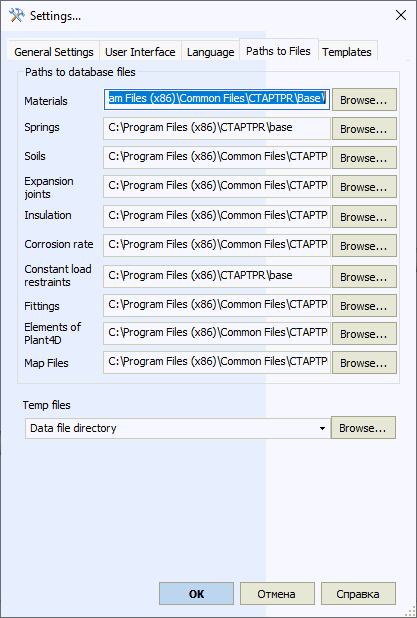
Property |
Description |
Database paths |
Paths to database files Materials: material database Springs: Variable Spring database Soils: Soil database Expansion Joints: Expansion joint database Insulation: Insulation database Constant load restraints: Constant spring database Fittings: Pipe and Fitting database Map Files: Settings for PCF and CAESAR II converters Templates: MS Word report template files |
Temporary files |
Folder for temporary START-PROF files. Requires read/write permissions. Choose specific folder or standard options:
|
Service > Settings