
Resting supports model sliding, roller, ball, and similar support types.
These supports restrict downward movement but disengage during upward displacement. Horizontal sliding generates friction forces opposing the direction of movement.
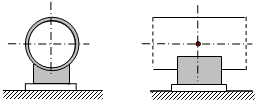
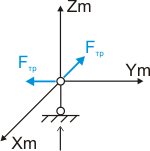
PASS/START-PROF models resting supports with one vertical single-directional linear restraint and two horizontal frictional restraints. For inclined sliding surfaces, use custom restraints. See "Custom Restraint Links"
For buried resting supports with downward subsidence, soil effects within 14 pipe diameters are disabled when pipe separates from support.
Property |
Description |
Name |
Element identifier. When checked, displays in 3D view. |
Weight |
Weight of support components attached to pipe. Applied at attachment node. When building structure allowable loads are specified, calculated load includes piping plus support weight. When support allowable loads are specified, either omit support weight or increase allowable load by support weight value. |
Friction factor |
|
Check allowable loads |
PASS/START-PROF automatically checks allowable load values against analysis results. Warnings display when values are exceeded. |
Loads in local axes |
When unchecked, allowable loads reference global coordinate system; when checked, they reference local axes of adjacent element. |
FX, FY, FZ |
Allowable load values for X, Y, and Z axes. |
To insert resting support, select node and use: Insert > Insert Restraint > Resting Support
or click  toolbar icon.
To view element properties:
Double-click element in 3D view
Select element
and click  toolbar icon