
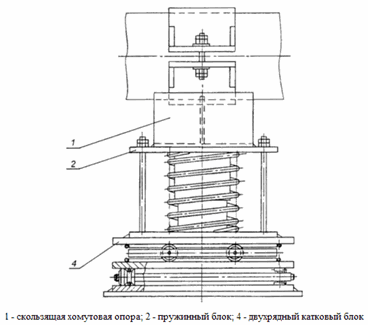
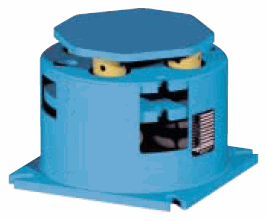
PASS/START-PROF can perform automatic variable spring selection and travel analysis. This analysis determines variable spring support and hanger properties. Specify the standard and piping state (operating or cold) in Project Settings.
This support models as one vertical spring restraint and two horizontal frictional restraints (fig. 1), with specified friction factor. See "custom restraints"
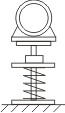
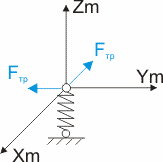
Fig. 1
Property |
Description |
Name |
Element name. When checked, displays in 3D view |
Weight |
Support weight (portion applied to pipe as load) |
Spring type |
LISEGA spring type (20, 28, 29). More... |
Support number |
Minimum structurally sound number of parallel spring chains (1 to 10). For example, riser variable spring supports require at least two chains. Output chain count matches or exceeds input based on allowable load requirements. Doubling chains doubles capacity and halves flexibility (doubles stiffness k). More... |
Load range, % |
Required load variation percentage. Ratio of operating/cold support load difference to operating load. Typically 35% recommended. For equipment sensitive to piping loads (turbines, pumps, etc.), use less than 35%. More... For LISEGA and WITZENMANN springs, maximum is 25% |
Extended range |
Enable extended spring load range |
Load safety factor, m |
Support load safety factor m = 1 ÷ 1.3 (load cannot exceed capacity). Select value based on design and installation experience. Typically m = 1 recommended. Higher values increase spring count and overall height. For springs contracting with thermal displacement, PASS/START-PROF automatically applies 15% safety factor increase per 1 . |
Allowable load |
Allowable load per chain for custom springs (type "other") |
Supporting force |
Total supporting force - required force from variable spring hangers in operating Rop or cold Rcold state (per Project Settings selection). When R = 0, automatic supporting force selection applies. When R ≠ 0, uses input value without automatic selection. Use for manual control of piping forces and equipment loads. More... |
Pre-compression force |
Pre-compression force Pз applied during spring compression outside piping system. More... |
Flexibility, l |
Flexibility or stiffness per chain. Zero values trigger automatic calculation. Non-zero values require manual chain composition and force calculation, with flexibility matching selected spring database value. More... |
Stiffness, K |
Stiffness is flexibility inverse K=1/l |
Friction factor |
|
Test state |
Account for temporary spring locking during testing |
Displacement range |
Spring travel range. Required when manually specifying stiffness since multiple ranges may share stiffness values. More... |
Check allowable loads |
Verify steel structure loads when structure capacity is less than spring hanger capacity |
Note: When both "flexibility" and "supporting force" are non-zero, PASS/START-PROF uses input values without spring selection. More...
To insert element, select the desired node and use: Insert > Insert Restraint > Variable Spring Support
or click the  or
or  toolbar icon.
To view existing element properties:
Double-click element in 3D view
Select element
and click  toolbar icon