This table appears only when automatic spring selection data and/or spring compression analysis data is entered in Project Settings.
Springs are selected from the springs database based on the standard and piping state (operating or cold) specified in Project Settings.
Variable spring support properties during pre-stretch and installation are not calculated values. If support loads and spring compression during pre-stretch exceed allowable values, the pre-stretch installation method cannot be used and must be noted on installation drawings. If this occurs during installation, temporary unloading procedures must be implemented.
If the calculated load difference exceeds the input value, reduce the input value and rerun the analysis. More information...
For detailed information about automatic spring selection and force control through spring compression, see Piping Analysis with Spring Supports.
Springs locked in test state are highlighted in blue.

Property |
Description |
Node number |
Node number where the variable spring support or hanger is located |
Operating load, Rop |
Spring compression force (support reaction) in operating mode. The load must not exceed the variable spring support allowable load Rmax with the specified safety factor m (entered in support properties) [1]. m∙Rop ≤ Rmax. The value in parentheses shows the calculated-to-allowable load ratio. More information... |
Cold load, Rcold |
Spring compression force (support reaction) in cold mode. The load must not exceed the variable spring support allowable load Rmax with the specified safety factor m (entered in support properties) [1]. m∙Rcold ≤ Rmax. The value in parentheses shows the calculated-to-allowable load ratio. More information... |
Installation load, Rassembly |
Spring compression force (support reaction) in installation state after spring adjustments (after cutting ties). The value in parentheses shows the calculated-to-allowable load ratio. More information... |
Spring pre-stretch, Pз |
Spring pre-stretch force. m∙Pз ≤ Rmax. If installation uses "two-step" or "separation" methods [2], the pre-stretch state does not exist and allowable load checking is not required. More information... |
Load variation, (%) |
Variable spring support load change from cold to operating state.
Note: If springs are selected in cold mode,
the cold load is used in the formula instead of operating
load. |
Number of spring chains |
Number of parallel chains (rods) in the support. If the rod count entered in variable spring support properties is insufficient for loads Rop, Rcold, the rod count is automatically increased during selection. |
Vertical travel Inst-Ope |
Displacement from installation to operating mode. Installation displacement minus operating displacement. More information... |
Vertical travel Ope-Cold |
Displacement from operating to cold mode. Operating displacement minus cold displacement. More information... |
Horizontal travel |
Maximum vertical displacement from installation to operating mode or from operating to cold mode. |
Chain structure |
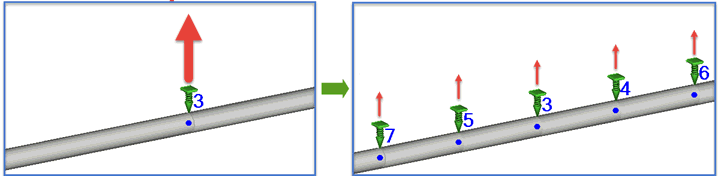
Chain structure containing category 1 and 2 springs: 1, 2, 2+1=3, 2+2=4, 2+2+1=5, 2+2+2=6, 2+2+2+1=7, etc. More information... |
Stiffness |
Spring stiffness |
Allowable load |
Spring allowable load |
Spring codes in chain structure |
Group types contained in chain structure |
Spring codes in standards |
Codes of all springs (according to standards) contained in chain structure |
Free height, Hfree |
Spring height without load. Selected from the springs database. More information... |
Operating height, Hop |
Spring height in operating state. Displayed only if the capacity condition m∙Rop ≤ Rmax is met. More information... |
Cold height, Hcold |
Spring height in cold state. Displayed only if the capacity condition m∙Rcold ≤ Rmax is met. More information... |
Installation height, Hassembly |
Spring height in installation state after spring adjustments. More information... |
Pre-stretch height, Hз |
Spring height during pre-stretch. Corresponds to installation state before cutting spring ties. More information... |
No. |
Note |
Description |
|---|---|---|
N210 |
Spring ignored as non-functioning. Upward spring travel from weight loads |
Error occurs when pipe displacement at the support location is upward due to piping weight, which contradicts variable spring support principles. Analysis proceeds without this support. Remove it from the model. |
N211 |
No springs with sufficient flexibility in catalog to satisfy 25% load variation. Spring ignored. Replace with constant load spring. |
Displacement is too large. No sufficiently flexible springs exist in the selected code to meet the specified load range limit (25% or 35% for Russian springs). Analysis proceeds without this variable spring support. Recommended actions: a) Add more variable spring hangers nearby. Software may select more flexible springs that meet both allowable load and load variation requirements. b) Modify the model or reposition variable spring hangers to reduce displacement range between operating and cold modes. c) Replace variable spring with constant spring support. |
N688 |
Variable spring support unnecessary, loads are zero. Recommended to delete. |
Variable spring support is unnecessary at this location because loads are zero. Recommended to delete it from the model. |
N298 |
Support with specified flexibility has insufficient allowable load. |
Error occurs when user-specified support flexibility results in springs with allowable load lower than the actual support load. |
W662 |
Specified load value exceeds maximum load for selected spring table or constant force hanger table. |
The maximum load on the specified spring or constant spring support exceeds the maximum value in the code table. No suitable springs or constant spring supports exist in the selected spring table. |
W329 |
Allowable load of springs in the support is insufficient. |
This message appears: 1. When flexibility (or stiffness) is specified for a variable spring support or variable spring hanger, and the spring's allowable load is lower than the analysis value for operating and cold states. Allowable load is determined from the springs database. 2. When flexibility is not specified and automatic spring selection cannot meet capacity requirements in operating and cold states. For models without nonlinear effects, this check always passes; with nonlinear effects, it may fail. Reduce the load change (%) for the variable spring support or hanger. |
W101 |
More than two parallel spring rods selected due to excessive load. Add more variable spring hangers or switch to constant spring hanger. |
The load on the variable spring hanger/support is too high, requiring additional parallel spring rods. Recommended actions: 1. Add more variable spring hangers nearby to distribute the load without increasing parallel rod count.
2. Switch to constant spring hanger, which can handle higher loads than variable spring hangers. |
W591 |
Number of parallel spring rods increased. |
The initial parallel spring rod count was 1 but automatically increased to 2. This occurs when the load is too high for one rod, or spring stiffness is too high to meet the variation ratio <25% requirement. If two parallel spring rods are insufficient: 1. Add more variable spring hangers nearby to distribute load without increasing rod count. 2. Switch to constant spring hanger for higher load capacity. |
W661 |
Load range exceeds allowable 25% (35% for Russian springs). |
This occurs for two reasons: 1. START-PROF cannot select a spring meeting the load range requirement (Rop-Rcold)/Rop <25% (35% for Russian springs). More flexible springs are needed but unavailable in the selected code, or more than two parallel rods are required. a) Add more variable spring hangers nearby. START-PROF may select more flexible springs meeting both requirements. b) Modify the model or reposition variable spring hangers to reduce displacement range. c) Replace with constant force hanger, which accommodates any load range. 2. Spring selection assumes no nonlinear effects, then reanalyzes with them included. The calculated load difference may exceed the input value. Specify a lower load range ratio in input data (15%, 10%, 5%, etc.) until the result meets the 25% (35%) limit. More information... |
1. Variable Spring Hanger Selection for Power and Nuclear Plants. RTM 24.038.12-72 Ministry of Heavy, Power and Transport, 1973
2. D.L. Kostovetsky, B.N. Tokarsky. About Variable Spring Hanger Tightening. CKTI. Design and Stress Analysis of Power Piping, 1966
After running an analysis with spring selection: Output > Variable Spring Hanger & Support Output