
PASS/START-PROF supports multiple independent piping segments within a single project file.

Independent segments display the following features:
Global
coordinate system origin in 3D view 
Base
node for each segment in 3D view

Absolute coordinates for each node in node properties
Create independent segments using these methods:
1. Create a pipe element connecting two new node numbers not in the current model
2. Copy an element and paste using Edit > Paste to Independent Node
3. Delete connecting elements to create separate segments
4. Insert an independent node and build disconnected piping from it
Each node in independent segments displays absolute global coordinates in node properties.
Set the coordinate origin for any selected node using Tools > Set Origin in the Node or the context menu option "Set Origin into this Node"
Each independent segment requires one base node with defined absolute coordinates. Assign any node as base node using "Set this Node as Base Node of Segment" in the context menu:
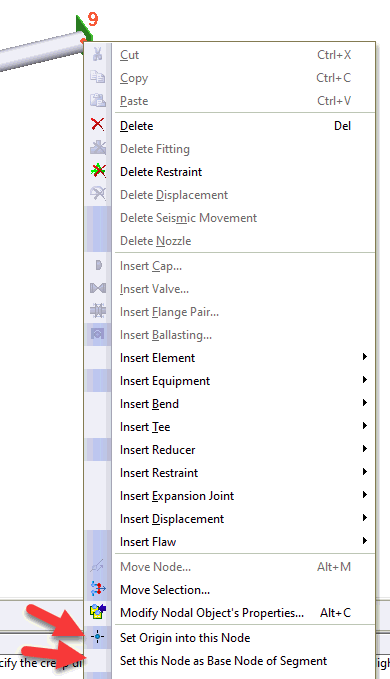
Base nodes remain fixed during model modifications. When changing piping dimensions, all node coordinates update except the base node.
Modifying base node coordinates moves the entire segment relative to the global origin and other independent segments.
View independent segments in the project tree.

Disable analysis for any independent segment by unchecking "Analyze segment" in the segment's base node properties.