Learn more about START-PROF pipe stress analysis software
Review analysis results in the Loads on Nozzles and Equipment Table. See also How to Reduce Nozzle Loads in START-PROF. Use the Other Pump object to verify loads on pumps such as API 676 Positive Displacement Pumps and similar equipment.
Property |
Description |
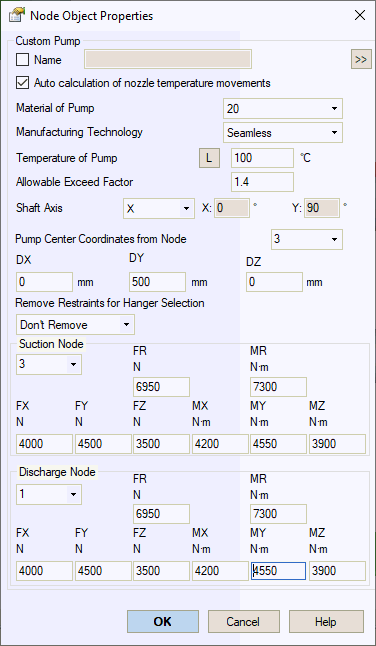
Name |
Element identifier. When checked, displays in 3D view. |
Auto calculation of nozzle temperature movements |
Automatically calculates nozzle thermal movements using DX*α*(T-Ta), DY*α*(T-Ta), DZ*α*(T-Ta), where α is the thermal expansion coefficient from material properties, T is operating temperature, Ta is ambient temperature, and DX, DY, DZ are distances from pump center. Clear this checkbox to enter movements manually. |
Material |
Material selection from materials database. |
Manufacturing technology |
For ASME B31.1, ASME B31.3, and DL/T 5366-2014, seamless pipe always uses Wl=1.0. Electric-welded pipe Wl values come from the database. More... When using GOST 32388-2013, pipe properties are retrieved from different materials databases based on pipe type (seamless or welded). |
Temperature |
Pump operating temperature. More... This
property varies by operating
mode. Click |
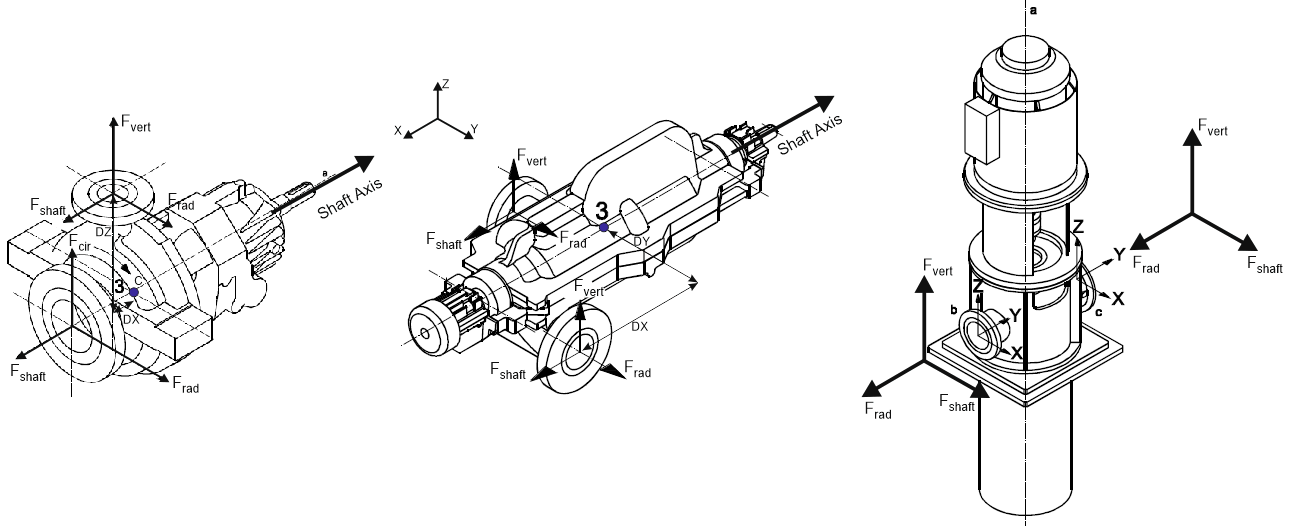
Fshaft Direction |
Shaft force direction relative to drawing orientation:
|
Pump Center Point Offsets |
Reference node and offset distances to pump center (point 3 in above diagrams). |
Remove restraints for hanger selection |
When enabled, temporarily removes specified restraints from nozzle during variable and constant spring selection for weight case. Restraints remain active during primary analysis. This method isolates the nozzle from weight loading, allowing springs to support loads at zero displacement under pure weight. Options:
|
Allowable Exceed Factor |
Default value: 1.4. Adjust according to pump manufacturer specifications.
|
Suction Nozzle Discharge Nozzle |
Assign node numbers for suction and discharge nozzle connections. Specify nozzle orientation (Top, Side, End). For disconnected piping, select "Set Custom Loads" to enter loads manually. |
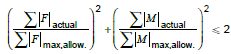
Pump allowable loads are validated against input data and checked using the following equation:
To insert a pump, select the target node and navigate to: Insert > Equipment > Other Pump
 to view values across
all operating modes.
to view values across
all operating modes.