
No property input required for moment free anchors. Use this element to model supports that provide zero moment resistance.
This restraint prevents pipe movement in upward, downward, axial, and transverse directions. Cross-section rotation resistance is negligible when the support length (dimension along pipe axis) is comparable to pipe cross-section dimensions (approximately 1 diameter). Rotational restraints (bending and rotation resistance) are disregarded. These supports provide no moment resistance and allow free rotation.
Example: A short support shoe can be modeled as a moment free anchor:
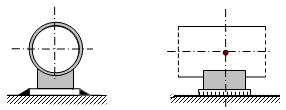
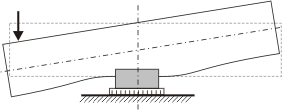
Also use moment free anchors when pipe continuation is unknown.
PASS/START-PROF models these supports with three double-acting linear rigid restraints. See "custom restraints"

Property |
Description |
Name |
Element identifier. When checked, displays in 3D view. |
Weight |
Support weight (portion attached to pipe). Applied to attachment node. For building structure allowable loads: piping weight plus support weight must not exceed allowable. For support allowable loads: calculated load includes piping weight plus support weight, which may be incorrect. Either omit support weight or increase allowable load by support weight value. |
Check allowable loads |
PASS/START-PROF automatically verifies analysis results against allowable load values. Warnings display when values are exceeded. |
Loads in local axes |
Unchecked: allowable loads reference global coordinate axes; Checked: allowable loads reference local axes of adjoining element. |
FX, FY, FZ |
Allowable load values for X, Y, and Z axes. |
To insert this element, select the target node and use: Insert > Insert Restraint > Moment Free Anchor
or click the  toolbar icon.
To view element properties:
Double-click the element in the 3D view
Select the
element and click the  toolbar icon