
The Move Node function relocates nodes along the axis of bends, straight pipe segments, or elbows. Both elements connected to the node must be collinear. Example application:

To move node 11, select it and click
the  toolbar icon. The Move Node dialog
appears:
toolbar icon. The Move Node dialog
appears:
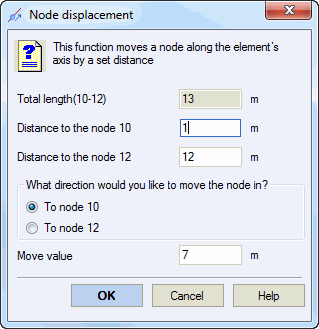
Specify the movement distance and target direction node.

Bend element movement follows the same procedure:

| Property | Description |
Total length |
Combined length of both elements connected to the node |
Distance to node |
Distance from new node position to adjacent nodes |
Move direction (to node) |
Target node defining movement direction |
Move value |
Displacement distance from current position |
Tools > Move Node