 button of the Main
toolbar or select the menu item "Tools - Options...".
These options include:
button of the Main
toolbar or select the menu item "Tools - Options...".
These options include:General settings
To set general program settings,
click the button of the Main
toolbar or select the menu item "Tools - Options...".
These options include:
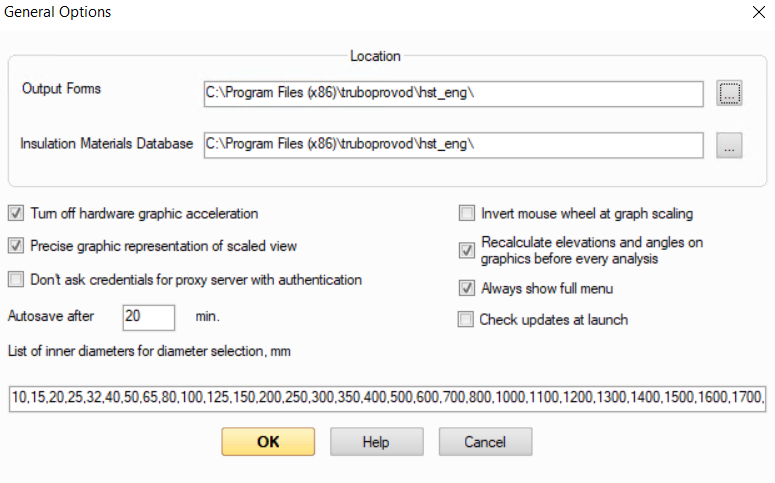
path to the location of the output forms files - in this field you can specify the path to the folder where the output documents templates are located, which the program will use when generating reports. For more information about output reports templates forms, see here;
path to the location of the insulation materials database - in this field you can specify the path to the folder where the insulation materials database file "InsulationDatabase.mdb" is located, which the program will use in heat and calculations of insulated pipelines. For more information about the materials database, see here;
By default, these files are located in the program installation folder. However, the output document form files (with the .lst extension) and the "InsulationDatabase.mdb" material database file can be copied to some other directory, after which the path to this directory can be specified in these fields - in this case, the program will use the forms and database from this folder. This may be necessary, for example, if the Hydrosystem is used on several computers in the organization. In such cases, it will be more convenient if all users of the program use common forms and a materials database (if one of the users changes something in them, these changes will immediately be available to all other Hydrosystem users). To do this, you need to copy the form files and the database to some publicly accessible network directory and specify the path to this common directory as the location of the database and document forms on all computers with the Hydrosystem. Or it may be convenient if the security policies on your computer are set up in such a way that the program installation folder C:\Program Files (x86)\truboprovod\hst_eng and C:\Program Files (x86)\Common Files\truboprovod folder (which contain the materials database files and output document forms) are read-only for your Windows account, and you cannot make any changes to the forms and the materials database. In this case, copy these files to any not write-protected directory, and then specify the path to this directory here.
When specifying paths to forms and the database manually, do not forget to specify the closing slash at the end of this path.
Turn off hardware graphic acceleration - by default, the program uses software emulation of the OpenGL driver (this is due to problems with graphics output on old video cards), i.e. hardware acceleration is not used. To speed up work with graphics, you can disable this option. For this change to take effect, the program must be restarted;
Precise graphic representation of scaled view - if this option is enabled (by default), then the lengths of all "point" elements of the pipeline (which from a hydraulic point of view are considered to have no length - valves, tees, etc.) when displayed on the piping diagram will not affect the overall length of the pipeline. The dimensions of these elements are "superimposed" on the adjacent pipe sections, so when the dimensions of such elements change, the positions of all other elements in the pipeline do not change. If this option is disabled, the conventional dimensions of "point" elements will be taken into account om piping diagram. However, this version of the piping diagram presentation may be inaccurate when modeling pipelines with closed loops;
Don’t ask credentials for proxy server with authentication - if your computer accesses the Internet via a proxy server with authentication (requiring login and password for access), then when you first launch the Hydrosystem, you must enter your login and password in the corresponding window for access to the proxy server, since some program functions, for example, the automatic update system or access to the Internet license, require Internet access. This login data is entered only once (at the first launch of the program) and is saved for subsequent launches of the program. However, if you do not enter your login and/or password for access to the proxy server (for example, if you do not have them), this will result in the program asking for their input every time it is launched (please note that the program itself will work normally, it is just that the functions requiring Internet access - automatic update and access to the Internet license - will be unavailable). To prevent this from happening, enable this option. If in the future you need to configure Internet access from the program through a proxy server with authentication, simply disable this option and restart the program - when launched again, the program will again ask for a login and/or password to access the proxy server;
Always show full menu - when this option is disabled, only frequently used items will be shown in the main program menu, and the rest will be available only when the menu is expanded;
Current project file autosave interval - a backup copy of the file will be saved after a specified period of time in the directory where the original project file is located (if the project was not saved to a file after creation, then in the Windows temporary files directory), under the same name, but with the .BAK extension. To restore a project from a backup copy, simply remove the .BAK extension from the file and open it in Hydrosystem;
Invert mouse wheel at graph scaling - this option allows you to customize how the rotation of the mouse wheel up and down is interpreted in the graphics window;
Recalculate elevations and angles on graphics before every analysis - this option allows you to check the piping model for errors in the entered elevation differences on the elements (as well as the angles of the bends and elbows) before each calculation and automatically correct them in the input data. Please note that this option should be used with caution when modeling a pipeline with closed loops, but the exact directions of the pipes in space are not specified at modeling (this often happens when modeling long pipelines, for which it is difficult to 'draw' the exact geometry and, in fact, is not necessary, since this is not at all critical for the accuracy of the calculation). In this case, the graphical representation of the pipeline does not reflect all the details of the geometry of the diagram, which can lead to incorrect recalculation (this is especially true for projections of loop closing pipes);
Check updates at the program launch;
A list of inner diameters for diameters selection - here you can edit a list of values from which the diameters will be selected at the diameters calculation of the pipeline. When editing this list, please note that the diameters values must be in ascending order and separated by commas.
When the program is first launched after installation, these settings are initialized with default values. The values entered by the user are saved in the Windows registry for subsequent launches of the program.