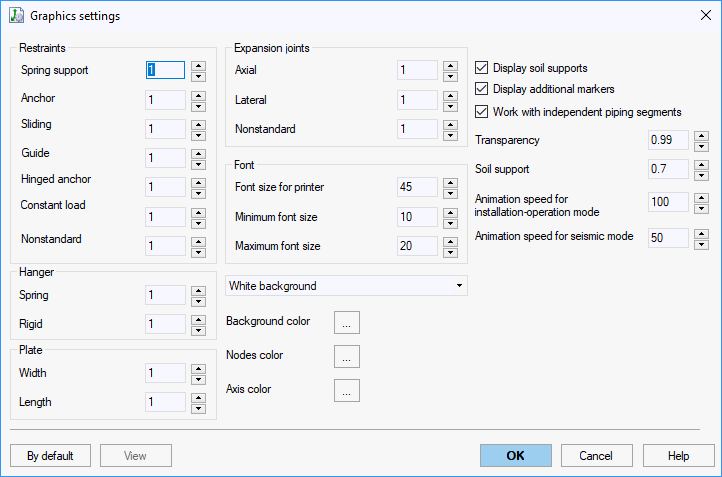
Customize 3D element dimensions, font sizes, background colors, and display properties in the 3D view.
Property |
Description |
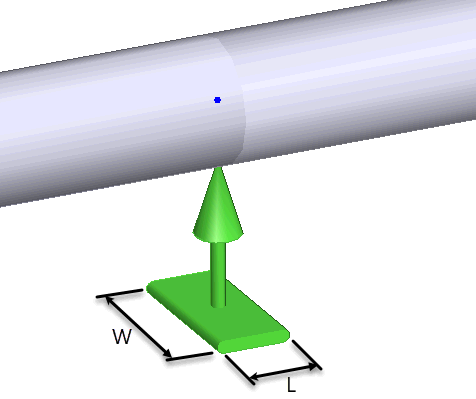
Plate width and length |
Restraint symbol plate dimensions
|
Font size for printing |
Text size for printed output |
Minimum font size |
Smallest text size when zoomed out |
Maximum font size |
Largest text size when zoomed in |
Background color |
Choose from white, black, or custom color |
Display soil supports |
Show soil support locations Soil supports appear only after analysis completion and only in input data view. They are informational only—cannot be selected, deleted, or edited. |
Display masses |
Show mass locations and values |
Display hidden markers |
Show hidden markers in model |
Independent piping segments |
Recommended for working with disconnected pipelines When enabled: Shows coordinate center, marks base nodes of all segments, and displays node coordinates relative to center point. |
View > Graphic Options > Graphics Settings