
Export of two-phase slug flow induced loads to START-Prof
The Hydrosystem provides the ability to calculate the unbalanced forces caused by gas-liquid 'slug-flow' and export them to the START-Prof piping stress analysis software. These forces are calculated in the bends and elbows of the pipeline if intermittent (slug, plug etc.) flow occurs in them.
The method for calculating the slug flow induced forces is based on the approach of the TUFFP model for bends lying in a horizontal plane (therefore, forces calculation is only possible when using the TUFFP methods for calculating gas-liquid flows). To find the projections of forces acting along the bend/elbow, the following equations are used:
where A– pipeline internal section area [m2],
 – Taylor bubble translational velocity [m/s],
 – elbow angle [deg.],
 – liquid holdup in liquid ‘slug’ [-],
 and
and  –
liquid and gas density [kg/m3].
–
liquid and gas density [kg/m3].
The calculation uses the mean arithmetic of the flow parameters at the beginning and end of the element (elbow/flow turn).
When calculating forces for "START-Prof", it is necessary to specify the value of the dynamic coefficient DLF in the pipeline calculation settings. To do this, select the pipeline in the project tree and open the "Analysis" tab of the Object Properties window for it:
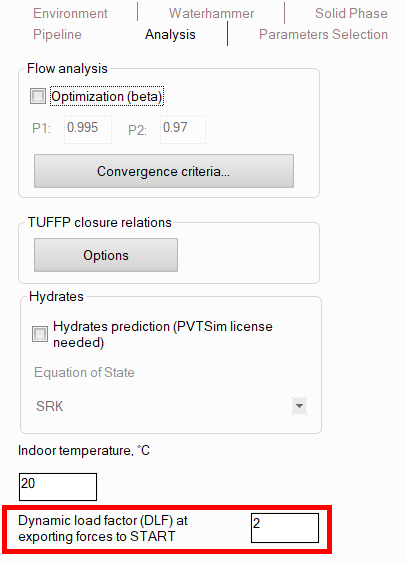
This factor allows to take into account that when dynamic loads are applied to the system, deformations can turn out to be 1.0–2.0 times greater than those from static loads. Since the calculation in the "START-Prof" from the slug flow loads is performed by the static method, to take into account the dynamic nature of the load, it is recommended to use the worst value of the dynamic coefficient DLF = 2.0. The calculated forces are multiplied by the dynamic load factor DLF, specified in the calculation settings (2 by default), the obtained values are transferred to the “START-Prof” software.
To transfer the calculated values of the forces to the “START-Prof” software, you should run the calculation and then select the “Analysis – Force Export – Slug flow – To START-PROF...” menu option. The program will generate a file (with the .ctpf extension), which is then loaded into the “START- Prof” software to take these forces into account in piping stress analysis. How to then use this file with forces in "START-Prof" is described in detail in the video at the link below:
https://youtu.be/DbuKhdWY-tU?si=GBwen5zv_aBIGiDt&t=2700