Export of waterhammer loads to START-Prof
The Hydrosystem provides the ability to calculate the unbalanced forces caused by a waterhammer transient process and export them to the START-Prof piping stress analysis software. These forces are calculated in the following pipeline nodes/elements:
nodes in which the flow direction changes;
elements/nodes in which diameter of a pipe changes;
elements with a changing state (opening/closing valves, for example);
branching nodes;
end nodes.
Forces are displayed only for those nodes/elements in which they are non-zero.
When calculating the forces, not absolute pressure values are used, but their excess over the value obtained at a steady-state calculation (isothermal flow analysis, diameters calculation or heat and hydraulic analysis). The forces are output only at those moments in time when absolute (in time) peaks are observed in one of the nodes, or simultaneous (possibly not absolute) peaks in several nodes. The algorithm for selecting the moments in time at which the force values are recorded for transferring them to the force file for START-Prof is described below:
The file includes all time points corresponding to the global maxima of each node (if these maxima exceed k1=0.5 of the largest maximum);
Moments of time corresponding to several of the largest extrema of the 'SRSS' functions (the square root of the sum of the squares of the forces at the nodes). Only extrema greater than k2=0.6 from the largest maximum are considered;
For active elements (causing waterhammer), the maximum forces directed in the positive and negative directions are considered separately;
Forces in nodes whose global maxima are less than 0.1 of the largest maximum are not output to the file;
The output of loads ceases after a certain point in time, which is defined as the global minimum of the 'SRSS' function after it reaches the global maximum. After this, as a rule, the patterns of the forces function waves repeat with attenuation;
If some peaks are located at a distance of one time step, then the first of them is taken.
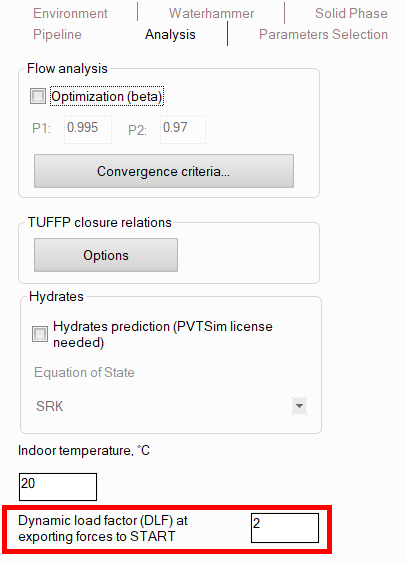
When calculating forces for "START-Prof", it is necessary to specify the value of the dynamic coefficient DLF in the pipeline calculation settings. To do this, select the pipeline in the project tree and open the "Analysis" tab of the Object Properties window for it:
This factor allows to take into account that when dynamic loads are applied to the system, deformations can turn out to be 1.0–2.0 times greater than those from static loads. Since the calculation in the "START-Prof" from the waterhammer loads is performed by the static method, to take into account the dynamic nature of the load, it is recommended to use the worst value of the dynamic coefficient DLF = 2.0. The calculated forces are multiplied by the dynamic load factor DLF, specified in the calculation settings (2 by default), the obtained values are transferred to the “START-Prof” software.
To transfer the peak values of the forces to the “START-Prof” software, you should run the waterhammer calculation (for more information on data input for water hammer calculation, see here), and after the calculation is completed, select the “Analysis – Force Export – Waterhammer – To START-PROF” menu option. The program will generate a file (with the .ctpf extension), which is then loaded into the “START- Prof” software to take these forces into account in piping stress analysis. How to then use this file with forces in "START-Prof" is described in detail in the video at the link below:
https://youtu.be/-ycRP_KEr8c?si=GgnM834APM9BX3PM