Waterhammer
damper
To add a new waterhammer
damper, click the button  of Components
toolbar and select the equipment type "Waterhammer
damper" (or use the corresponding item of "Insert
- Component - Equipment" menu). Please
note that the new component is added to the project tree after the currently
selected element. Therefore, to add a new component after an existing
one, select it in the project tree or in the graphic window and add the
new component. If you need to add a new component to the beginning of
a branch, select the branch in the project tree and add the new component.
of Components
toolbar and select the equipment type "Waterhammer
damper" (or use the corresponding item of "Insert
- Component - Equipment" menu). Please
note that the new component is added to the project tree after the currently
selected element. Therefore, to add a new component after an existing
one, select it in the project tree or in the graphic window and add the
new component. If you need to add a new component to the beginning of
a branch, select the branch in the project tree and add the new component.
The waterhammer damper element is
used to model the so-called "gas accumulators" designed to smooth
out shock waves at waterhammer. This gas accumulator is a vessel, part
of which is filled with working fluid, part with gas (usually air). The
phases in this vessel are separated either by a soft rubber membrane,
or a light piston, or the phase boundary can be open. The compressed gas
in the vessel serves as a damper, smoothing out sharp pressure surges.
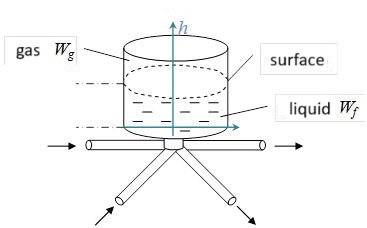
Since the damper does not have any
effect on the operation of the pipeline in a steady state, dampers can
be omitted when performing steady state flow calculations (isothermal
flow analysis,heat calculation etc.).
After adding a waterhammer
damper, its characteristics will be displayed in the Object
Properties Window:
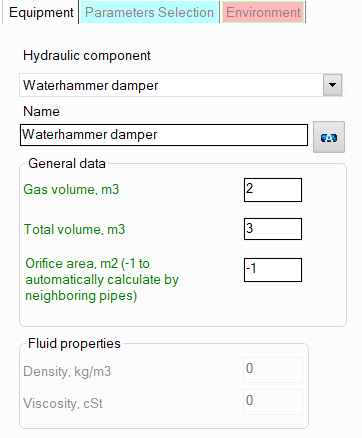
name -
by default, the name of any piping component coincides with its type,
but if necessary, the name can be changed in this field. When changing
the hydraulic component type (when selecting different types of equipment),
its name will also change, but only if it has not been previously
changed to another manually. Specify the name that you would like
to see for this element in reports with calculation results. To display
the name of a pipeline element on the diagram, click the corresponding
button to the right of its name;
total volume
of a damper and gas volume in it - please note that the
initial volume of
gas in the vessel should be specified as the "Gas
volume";
orifice
area - the cross-section area of the nozzle connecting
the damper to the pipeline. If the cross-section of the nozzle is
the same as that of the pipeline, enter -1 in this field.